<?xml version="1.0" encoding="utf-8"?>
<feed xmlns="http://www.w3.org/2005/Atom">
  <title>Simply Ian</title>
  <subtitle>A blog on software, technology, and life.</subtitle>
  <link href="/atom.xml" rel="self"/>
  
  <link href="https://simplyian.com/"/>
  <updated>2016-07-10T19:04:10.000Z</updated>
  <id>https://simplyian.com/</id>
  
  <author>
    <name>Ian Macalinao</name>
    <email>me@ian.pw</email>
  </author>
  
  <generator uri="http://hexo.io/">Hexo</generator>
  
  <entry>
    <title>How Go solves date and time formatting</title>
    <link href="https://simplyian.com/2016/07/10/How-Go-solves-date-and-time-formatting/"/>
    <id>https://simplyian.com/2016/07/10/How-Go-solves-date-and-time-formatting/</id>
    <published>2016-07-10T18:25:41.000Z</published>
    <updated>2016-07-10T19:04:10.000Z</updated>
    
    <content type="html"><![CDATA[<p>Recently, I’ve had the <a href="http://www.dadhacker.com/blog/?p=1585" target="_blank" rel="external">pleasure</a> of working with date and time in a side project written in Go.</p>
<p>I had to parse some dates in YYYY-mm-dd (ISO 8601) format. I read the <a href="https://golang.org/pkg/time/" target="_blank" rel="external">Go documentation</a> on the <code>time</code> package and found the <code>time.Parse</code> method. The examples were really weird:</p>
<figure class="highlight go"><table><tr><td class="gutter"><pre><span class="line">1</span><br><span class="line">2</span><br><span class="line">3</span><br><span class="line">4</span><br><span class="line">5</span><br><span class="line">6</span><br><span class="line">7</span><br><span class="line">8</span><br><span class="line">9</span><br><span class="line">10</span><br><span class="line">11</span><br><span class="line">12</span><br><span class="line">13</span><br><span class="line">14</span><br><span class="line">15</span><br><span class="line">16</span><br></pre></td><td class="code"><pre><span class="line"><span class="comment">// See the example for time.Format for a thorough description of how</span></span><br><span class="line"><span class="comment">// to define the layout string to parse a time.Time value; Parse and</span></span><br><span class="line"><span class="comment">// Format use the same model to describe their input and output.</span></span><br><span class="line"></span><br><span class="line"><span class="comment">// longForm shows by example how the reference time would be represented in</span></span><br><span class="line"><span class="comment">// the desired layout.</span></span><br><span class="line"><span class="keyword">const</span> longForm = <span class="string">"Jan 2, 2006 at 3:04pm (MST)"</span></span><br><span class="line">t, _ := time.Parse(longForm, <span class="string">"Feb 3, 2013 at 7:54pm (PST)"</span>)</span><br><span class="line">fmt.Println(t)</span><br><span class="line"></span><br><span class="line"><span class="comment">// shortForm is another way the reference time would be represented</span></span><br><span class="line"><span class="comment">// in the desired layout; it has no time zone present.</span></span><br><span class="line"><span class="comment">// Note: without explicit zone, returns time in UTC.</span></span><br><span class="line"><span class="keyword">const</span> shortForm = <span class="string">"2006-Jan-02"</span></span><br><span class="line">t, _ = time.Parse(shortForm, <span class="string">"2013-Feb-03"</span>)</span><br><span class="line">fmt.Println(t)</span><br></pre></td></tr></table></figure>
<p>Apparently, you need to pass in an example date or time? From the <code>time.Format</code> documentation:</p>
<blockquote>
<p>The layout string used by the Parse function and Format method<br>shows by example how the reference time should be represented.<br>We stress that one must show how the reference time is formatted,<br>not a time of the user’s choosing. Thus each layout string is a<br>representation of the time stamp,<br>  Jan 2 15:04:05 2006 MST<br>An easy way to remember this value is that it holds, when presented<br>in this order, the values (lined up with the elements above):<br>  1 2  3  4  5    6  -7</p>
</blockquote>
<p>Of course, me being a hasty programmer when it comes to side projects, I spent about 20 minutes figuring out why <code>time.Parse(&quot;2016-01-01&quot;, someTime)</code> didn’t work.</p>
<p>This means that <code>01</code> will always represent a month and <code>02</code> will always represent a day. See the examples below:</p>
<figure class="highlight go"><table><tr><td class="gutter"><pre><span class="line">1</span><br><span class="line">2</span><br><span class="line">3</span><br><span class="line">4</span><br></pre></td><td class="code"><pre><span class="line">t, _ := time.Parse(<span class="string">"2006-01-02"</span>, <span class="string">"2016-07-04"</span>)</span><br><span class="line">fmt.Println(t.Format(time.RFC822))  <span class="comment">// prints out 04 Jul 16 00:00 UTC</span></span><br><span class="line">t, _ = time.Parse(<span class="string">"2006-02-01"</span>, <span class="string">"2016-07-04"</span>)</span><br><span class="line">fmt.Println(t.Format(time.RFC822))  <span class="comment">// prints out 07 Apr 16 00:00 UTC</span></span><br></pre></td></tr></table></figure>
<p>At first, I thought: <em>Ambiguous magic values? HELL NO.</em> Furthermore, <code>01</code> and <code>02</code> aren’t even constants defined in the package. There is no <code>time.Month</code> or <code>time.Day</code>. It’s just something you have to know. But after looking at other solutions again, I think this is a better way of doing things.</p>
<h1 id="Strftime-sucks"><a href="#Strftime-sucks" class="headerlink" title="Strftime sucks"></a>Strftime sucks</h1><p>The most popular date formatting function is probably <code>strftime</code>. What if you wanted to format a date in the format of <code>07/10/2016 18:43PM</code>? What format string would you use? Stop reading for a few seconds and try to think about it.</p>
<p>.</p>
<p>.</p>
<p>.</p>
<p>.</p>
<p>The answer is, you’d use the string <code>%m/%d/%Y %H:%M:%p</code>.</p>
<p>Did you get it right, casing and everything? If so, great! You have an amazing memory. However, you probably don’t remember every single flag from <code>strftime</code> unless you’re some sort of masochist.</p>
<p>Now, how would you write this in Go? Remember the 1, 2, 3, 4, 5, 6 mnemonic. The answer is <code>01/02/2006 15:04PM</code>. (15 since we’re using 24 hour time, and that is 3PM). You just need to memorize 7 numbers and what they mean and you’ll be able to format any date.</p>
<p>Let’s try a different one: <code>Sun, 10 Jul 2016 18:43:00</code>. Try to do both this time.</p>
<p>In strftime: <code>%a, %e %b %Y %H:%M:%S</code>.</p>
<p>In Go: <code>Mon, 02 Jan 2006 15:04:05</code>.</p>
<p>You probably didn’t know you were supposed to use <code>Mon</code> – just remember Go does the most obvious thing, which should have been the first day of the week internationally. You can just remember the RFC3339 string <code>Mon, 02 Jan 2006 15:04:05 -0700</code> to remember what the placeholders are.</p>
<p>Which one was easier to come up with? Chances are you had to read through a long man page of some sort to figure out the first one. No wonder websites like <a href="http://www.foragoodstrftime.com/" target="_blank" rel="external">For a Good Strftime</a> exist!</p>
<p>You may be a Java programmer. Honestly, I think <a href="http://docs.oracle.com/javase/6/docs/api/java/text/SimpleDateFormat.html" target="_blank" rel="external">SimpleDateFormat</a> is just as bad. Try this exercise with this instead of strftime and see the results.</p>
<p>While unconventional, Go does time and date formatting really well. Yet another reason why Go is an amazing language.</p>
]]></content>
    
    <summary type="html">
    
      &lt;p&gt;Recently, I’ve had the &lt;a href=&quot;http://www.dadhacker.com/blog/?p=1585&quot; target=&quot;_blank&quot; rel=&quot;external&quot;&gt;pleasure&lt;/a&gt; of working with date a
    
    </summary>
    
    
      <category term="go" scheme="https://simplyian.com/tags/go/"/>
    
  </entry>
  
  <entry>
    <title>Why Go&#39;s structs are superior to class-based inheritance</title>
    <link href="https://simplyian.com/2016/06/28/Why-Go-s-structs-are-superior-to-class-based-inheritance/"/>
    <id>https://simplyian.com/2016/06/28/Why-Go-s-structs-are-superior-to-class-based-inheritance/</id>
    <published>2016-06-28T19:25:29.000Z</published>
    <updated>2016-07-10T18:25:06.000Z</updated>
    
    <content type="html"><![CDATA[<p>Go is unique from a lot of object-oriented languages in that it doesn’t have classes. Instead, Go has two awesome features that make its model of polymorphism way more powerful than classical inheritance: interfaces and struct embedding.</p>
<h2 id="Interfaces"><a href="#Interfaces" class="headerlink" title="Interfaces"></a>Interfaces</h2><p>Interfaces in Go are very different from, say, Java interfaces. You don’t explicitly say a data type implements an interface; rather, your data types must implement all of the methods that the interface defines, and the compiler checks to see if assignments to variables of the interface type are valid.</p>
<p>For example, let’s define an Animal interface as so:</p>
<figure class="highlight go"><table><tr><td class="gutter"><pre><span class="line">1</span><br><span class="line">2</span><br><span class="line">3</span><br></pre></td><td class="code"><pre><span class="line"><span class="keyword">type</span> Animal <span class="keyword">interface</span> &#123;</span><br><span class="line">    Name() <span class="keyword">string</span></span><br><span class="line">&#125;</span><br></pre></td></tr></table></figure>
<p>The following type satisfies the Animal interface since it has all the methods Animal implements:</p>
<figure class="highlight go"><table><tr><td class="gutter"><pre><span class="line">1</span><br><span class="line">2</span><br><span class="line">3</span><br><span class="line">4</span><br><span class="line">5</span><br><span class="line">6</span><br><span class="line">7</span><br><span class="line">8</span><br><span class="line">9</span><br></pre></td><td class="code"><pre><span class="line"><span class="keyword">type</span> Dog <span class="keyword">struct</span> &#123;&#125;</span><br><span class="line"></span><br><span class="line"><span class="function"><span class="keyword">func</span> <span class="params">(d *Dog)</span> <span class="title">Name</span><span class="params">()</span> <span class="title">string</span></span> &#123;</span><br><span class="line">    <span class="keyword">return</span> <span class="string">"Dog"</span></span><br><span class="line">&#125;</span><br><span class="line"></span><br><span class="line"><span class="function"><span class="keyword">func</span> <span class="params">(d *Dog)</span> <span class="title">Bark</span><span class="params">()</span></span> &#123;</span><br><span class="line">    fmt.Println(<span class="string">"Woof!"</span>)</span><br><span class="line">&#125;</span><br></pre></td></tr></table></figure>
<p>Thus, the following code is valid:</p>
<figure class="highlight go"><table><tr><td class="gutter"><pre><span class="line">1</span><br><span class="line">2</span><br><span class="line">3</span><br><span class="line">4</span><br><span class="line">5</span><br></pre></td><td class="code"><pre><span class="line"><span class="function"><span class="keyword">func</span> <span class="title">main</span><span class="params">()</span></span> &#123;</span><br><span class="line">    <span class="keyword">var</span> animal Animal</span><br><span class="line">    animal = &amp;Dog&#123;&#125;  <span class="comment">// returns a pointer to a new Dog</span></span><br><span class="line">    fmt.Println(animal.Name())  <span class="comment">// Dog</span></span><br><span class="line">&#125;</span><br></pre></td></tr></table></figure>
<p>However, the following does not work:</p>
<figure class="highlight go"><table><tr><td class="gutter"><pre><span class="line">1</span><br><span class="line">2</span><br><span class="line">3</span><br><span class="line">4</span><br></pre></td><td class="code"><pre><span class="line"><span class="function"><span class="keyword">func</span> <span class="title">main</span><span class="params">()</span></span> &#123;</span><br><span class="line">    <span class="keyword">var</span> animal Animal</span><br><span class="line">    animal = Dog&#123;&#125;  <span class="comment">// compile error!</span></span><br><span class="line">&#125;</span><br></pre></td></tr></table></figure>
<p>since <code>*Dog</code>, not <code>Dog</code>, satisfies the interface.</p>
<p>You can also compose interfaces like this:</p>
<figure class="highlight go"><table><tr><td class="gutter"><pre><span class="line">1</span><br><span class="line">2</span><br><span class="line">3</span><br><span class="line">4</span><br></pre></td><td class="code"><pre><span class="line"><span class="keyword">type</span> PartyAnimal <span class="keyword">interface</span> &#123;</span><br><span class="line">    Animal</span><br><span class="line">    Party()</span><br><span class="line">&#125;</span><br></pre></td></tr></table></figure>
<p>This defines an interface <code>PartyAnimal</code> which must satisfy all methods of Animal on top of satisfying <code>Party()</code>, thus the following is equivalent:</p>
<figure class="highlight go"><table><tr><td class="gutter"><pre><span class="line">1</span><br><span class="line">2</span><br><span class="line">3</span><br><span class="line">4</span><br></pre></td><td class="code"><pre><span class="line"><span class="keyword">type</span> PartyAnimal <span class="keyword">interface</span> &#123;</span><br><span class="line">    Name() <span class="keyword">string</span></span><br><span class="line">    Party()</span><br><span class="line">&#125;</span><br></pre></td></tr></table></figure>
<h2 id="Struct-embedding"><a href="#Struct-embedding" class="headerlink" title="Struct embedding"></a>Struct embedding</h2><p>Let’s say we want to create a type that does everything a Dog does, but more. Let’s call it a GuideDog, and give it a method <code>Help(h *Human)</code>. We can do that like so:</p>
<figure class="highlight go"><table><tr><td class="gutter"><pre><span class="line">1</span><br><span class="line">2</span><br><span class="line">3</span><br><span class="line">4</span><br><span class="line">5</span><br><span class="line">6</span><br><span class="line">7</span><br><span class="line">8</span><br><span class="line">9</span><br><span class="line">10</span><br><span class="line">11</span><br><span class="line">12</span><br></pre></td><td class="code"><pre><span class="line"><span class="keyword">type</span> GuideDog <span class="keyword">struct</span> &#123;</span><br><span class="line">    *Dog</span><br><span class="line">&#125;</span><br><span class="line"></span><br><span class="line"><span class="function"><span class="keyword">func</span> <span class="params">(gd *GuideDog)</span> <span class="title">Help</span><span class="params">(h *Human)</span></span> &#123;</span><br><span class="line">    fmt.Printf(<span class="string">"Hey human, grab %s's leash!\n"</span>, gd.Name())</span><br><span class="line">&#125;</span><br><span class="line"></span><br><span class="line"><span class="function"><span class="keyword">func</span> <span class="title">main</span><span class="params">()</span></span> &#123;</span><br><span class="line">    gd := &amp;GuideDog&#123;&#125;</span><br><span class="line">    gd.Help(<span class="literal">nil</span>)  <span class="comment">// prints "Hey human, grab Dog's leash!"</span></span><br><span class="line">&#125;</span><br></pre></td></tr></table></figure>
<p>This calls the <code>Name</code> method on the embedded <code>*Dog</code> to do this.</p>
<p>Side note: even though we didn’t initialize the <code>*Dog</code>, we won’t get a null pointer exception here. This is because <code>*Dog#name</code> doesn’t access any struct attributes. Nifty, huh?</p>
<p>Now what if we do something like this:</p>
<figure class="highlight go"><table><tr><td class="gutter"><pre><span class="line">1</span><br><span class="line">2</span><br><span class="line">3</span><br><span class="line">4</span><br><span class="line">5</span><br><span class="line">6</span><br><span class="line">7</span><br><span class="line">8</span><br><span class="line">9</span><br><span class="line">10</span><br><span class="line">11</span><br><span class="line">12</span><br><span class="line">13</span><br><span class="line">14</span><br><span class="line">15</span><br></pre></td><td class="code"><pre><span class="line"><span class="keyword">type</span> Cat <span class="keyword">struct</span> &#123;&#125;</span><br><span class="line"></span><br><span class="line"><span class="function"><span class="keyword">func</span> <span class="params">(c *Cat)</span> <span class="title">Name</span><span class="params">()</span> <span class="title">string</span></span> &#123;</span><br><span class="line">    <span class="keyword">return</span> <span class="string">"Cat"</span></span><br><span class="line">&#125;</span><br><span class="line"></span><br><span class="line"><span class="keyword">type</span> CatDog <span class="keyword">struct</span> &#123;</span><br><span class="line">    *Cat</span><br><span class="line">    *Dog</span><br><span class="line">&#125;</span><br><span class="line"></span><br><span class="line"><span class="function"><span class="keyword">func</span> <span class="title">main</span><span class="params">()</span></span> &#123;</span><br><span class="line">    cd := &amp;CatDog&#123;&#125;</span><br><span class="line">    fmt.Printf(<span class="string">"My favorite animal is the %s!\n"</span>, cd.Name())</span><br><span class="line">&#125;</span><br></pre></td></tr></table></figure>
<p>This doesn’t compile! <code>cd.Name()</code> is an ambiguous call. To fix this, we must add this method:</p>
<figure class="highlight go"><table><tr><td class="gutter"><pre><span class="line">1</span><br><span class="line">2</span><br><span class="line">3</span><br></pre></td><td class="code"><pre><span class="line"><span class="function"><span class="keyword">func</span> <span class="params">(cd *CatDog)</span> <span class="title">Name</span><span class="params">()</span> <span class="title">string</span></span> &#123;</span><br><span class="line">    <span class="keyword">return</span> fmt.Sprintf(<span class="string">"%s%s"</span>, cd.Cat.Name(), cd.Dog.Name())</span><br><span class="line">&#125;</span><br></pre></td></tr></table></figure>
<p>Now the program will print the following message:</p>
<figure class="highlight plain"><table><tr><td class="gutter"><pre><span class="line">1</span><br></pre></td><td class="code"><pre><span class="line">My favorite animal is the CatDog!</span><br></pre></td></tr></table></figure>
<p>This seems kind of tricky, but in the following sections I’ll cover why this is so awesome.</p>
<h2 id="Go-polymorphism"><a href="#Go-polymorphism" class="headerlink" title="Go polymorphism"></a>Go polymorphism</h2><p>Go polymorphism involves creating many different data types that satisfy a common interface. This is different from Java in that Java polymorphism also allows satisfying a common base class, which can lead to many problems.</p>
<h2 id="The-fragile-base-class-problem"><a href="#The-fragile-base-class-problem" class="headerlink" title="The fragile base class problem"></a>The fragile base class problem</h2><p>Wikipedia defines the fragile base class problem as the following:</p>
<blockquote>
<p>The fragile base class problem is a fundamental architectural problem of object-oriented programming systems where base classes (superclasses) are considered “fragile” because seemingly safe modifications to a base class, when inherited by the derived classes, may cause the derived classes to malfunction. The programmer cannot determine whether a base class change is safe simply by examining in isolation the methods of the base class.</p>
</blockquote>
<p>Basically, classes are the tightest form of coupling in object-oriented programming, and this is a bad thing. Changing a base class can cause unwanted side effects all over a code base.</p>
<p>For example, let’s say I am building a game called MyCraft and I need to create some items, which are all derived from the Item base class. Let’s say a lot of these items are Blocks, which are derived from Item. I create two blocks, a Sponge and a Brick. But what if Brick requires a change from the Item class, e.g. it needs to handle different burn behavior, and I cannot isolate the change to the Brick class? I make my change to Item and everything but Brick breaks. These kinds of mistakes are common in class-based inheritance.</p>
<p>You need to inherit all behavior from base classes in a class based inheritance model, but often times you don’t want everything.</p>
<h2 id="Favor-composition-over-inheritance"><a href="#Favor-composition-over-inheritance" class="headerlink" title="Favor composition over inheritance"></a>Favor composition over inheritance</h2><p>There is a famous statement in object oriented programming to <a href="https://en.wikipedia.org/wiki/Composition_over_inheritance" target="_blank" rel="external">favor composition over inheritance</a>. Making complex, multi-tiered class inheritance structures is a bad idea in general, as it makes your code more resistance to change.</p>
<p>With composition, you can pick different features rather than classes. You can compose your Brick of Block and Unburnable rather than making changes to a rigid class hierarchy. Class inheritance forces you to use an existing structure that may not be the best for your use case.</p>
<h2 id="Conclusion"><a href="#Conclusion" class="headerlink" title="Conclusion"></a>Conclusion</h2><p>Go’s struct embedding is amazing. It disguises composition as inheritance and allows easily changing implementation details via its powerful interfaces. It is much more powerful than a class-based inheritance model, as it allows a much greater degree of flexibility.</p>
]]></content>
    
    <summary type="html">
    
      &lt;p&gt;Go is unique from a lot of object-oriented languages in that it doesn’t have classes. Instead, Go has two awesome features that make its 
    
    </summary>
    
    
      <category term="software" scheme="https://simplyian.com/tags/software/"/>
    
      <category term="Go" scheme="https://simplyian.com/tags/Go/"/>
    
  </entry>
  
  <entry>
    <title>Should you test private methods?</title>
    <link href="https://simplyian.com/2016/06/28/Should-you-test-private-methods/"/>
    <id>https://simplyian.com/2016/06/28/Should-you-test-private-methods/</id>
    <published>2016-06-28T19:22:06.000Z</published>
    <updated>2016-07-10T18:25:06.000Z</updated>
    
    <content type="html"><![CDATA[<p>At the last place I worked, I was told not to test private methods since it was an “implementation detail”. Some of these methods involved complex math or tons of branching.</p>
<p>I believe private methods should be tested. Would you only test a car by driving it in a million different conditions? Or would you also test the individual components to see if they are all functioning well? I say the latter.</p>
<h1 id="Disadvantages-of-only-testing-public-methods"><a href="#Disadvantages-of-only-testing-public-methods" class="headerlink" title="Disadvantages of only testing public methods"></a>Disadvantages of only testing public methods</h1><h2 id="You-need-to-write-more-tests"><a href="#You-need-to-write-more-tests" class="headerlink" title="You need to write more tests"></a>You need to write more tests</h2><p>By only testing public methods, you have to write an exponential amount of test cases to cover every permutation of branching possible in all of the methods each method calls.</p>
<p>For example, if you write a method that calculates something with 4 possible outcomes, you should write 4 tests to cover those branches. However, if that method is private and is called by a function that calculates something with another 3 possible outcomes, you must write 4 * 3 = 12 tests to test every branch.</p>
<p>This is pretty hard to maintain, even if you use something like table-driven tests. When you add another branch, you need to double the amount of tests in your code.</p>
<h2 id="Your-tests-run-much-slower"><a href="#Your-tests-run-much-slower" class="headerlink" title="Your tests run much slower"></a>Your tests run much slower</h2><p>In general, you only export functions that will be called by other people. Thus these functions are likely to call all sorts of different injected services to perform whatever action they need to accomplish.</p>
<p>To keep your tests reproducible and deterministic, you should be mocking all of the services your functions call in the testing phase. Doing this can take a lot of precious CPU cycles if you have, say, 100 services to stub out.</p>
<p>Furthermore, as said above, you have many more tests to write to test all branches, so you need to worry about running a lot more tests.</p>
<h2 id="Tests-are-less-concise"><a href="#Tests-are-less-concise" class="headerlink" title="Tests are less concise"></a>Tests are less concise</h2><p>In general, integration tests (tests between many functions) have a lot more going on, so they will be much less concise. A test also serves as documentation, so writing a huge test is much harder to parse than a tiny test that documents only what you’re looking at.</p>
<h2 id="Tests-are-harder-to-debug-when-they-break"><a href="#Tests-are-harder-to-debug-when-they-break" class="headerlink" title="Tests are harder to debug when they break"></a>Tests are harder to debug when they break</h2><p>Less code is easier to debug. Granularity is great because it isolates the bug better.</p>
<h1 id="Conclusion"><a href="#Conclusion" class="headerlink" title="Conclusion"></a>Conclusion</h1><p>Test your private methods. Write less tests. Spend less time debugging. Be a happy developer.</p>
]]></content>
    
    <summary type="html">
    
      &lt;p&gt;At the last place I worked, I was told not to test private methods since it was an “implementation detail”. Some of these methods involve
    
    </summary>
    
    
      <category term="software" scheme="https://simplyian.com/tags/software/"/>
    
      <category term="testing" scheme="https://simplyian.com/tags/testing/"/>
    
  </entry>
  
  <entry>
    <title>Using Underscore.js templates within ERB</title>
    <link href="https://simplyian.com/2016/02/09/Using-Underscore-js-templates-within-ERB/"/>
    <id>https://simplyian.com/2016/02/09/Using-Underscore-js-templates-within-ERB/</id>
    <published>2016-02-09T15:11:36.000Z</published>
    <updated>2016-02-10T03:49:53.000Z</updated>
    
    <content type="html"><![CDATA[<p>You don’t always have React to create a new feature on a website. Recently, I used Underscore and jQuery within a Rails application to create a dynamic page.</p>
<h2 id="Underscore-jQuery-gt-Easy-templating"><a href="#Underscore-jQuery-gt-Easy-templating" class="headerlink" title="Underscore + jQuery -&gt; Easy templating"></a>Underscore + jQuery -&gt; Easy templating</h2><p>If you specify an unknown script type in a script tag, you can insert code blocks into your code that aren’t rendered. For example, here I’ll define a quick template:</p>
<figure class="highlight html"><table><tr><td class="gutter"><pre><span class="line">1</span><br><span class="line">2</span><br><span class="line">3</span><br></pre></td><td class="code"><pre><span class="line"><span class="tag">&lt;<span class="name">script</span> <span class="attr">id</span>=<span class="string">"myTemplate"</span> <span class="attr">type</span>=<span class="string">"text/template"</span>&gt;</span><span class="javascript"></span><br><span class="line">Hello, <span class="xml"><span class="tag">&lt;<span class="name">%=</span> <span class="attr">target</span> %&gt;</span>!</span><br><span class="line"></span></span><span class="tag">&lt;/<span class="name">script</span>&gt;</span></span><br></pre></td></tr></table></figure>
<p>You can then access the contents of this script tag easily using jQuery:</p>
<figure class="highlight javascript"><table><tr><td class="gutter"><pre><span class="line">1</span><br></pre></td><td class="code"><pre><span class="line"><span class="keyword">var</span> templateStr = $(<span class="string">'#myTemplate'</span>).html();</span><br></pre></td></tr></table></figure>
<p>Using Underscore, we can compile this into a template function like so:</p>
<figure class="highlight javascript"><table><tr><td class="gutter"><pre><span class="line">1</span><br><span class="line">2</span><br><span class="line">3</span><br></pre></td><td class="code"><pre><span class="line"><span class="keyword">var</span> template = _.template($(<span class="string">'#myTemplate'</span>).html())</span><br><span class="line"></span><br><span class="line"><span class="built_in">console</span>.log(template(&#123; target: <span class="string">'world'</span> &#125;)) <span class="comment">// prints 'Hello, world!'</span></span><br></pre></td></tr></table></figure>
<p>With jQuery, we can render this template to the page very easily.</p>
<p>First, let’s declare a div to render this content within:</p>
<figure class="highlight html"><table><tr><td class="gutter"><pre><span class="line">1</span><br></pre></td><td class="code"><pre><span class="line"><span class="tag">&lt;<span class="name">div</span> <span class="attr">id</span>=<span class="string">"mount"</span>&gt;</span><span class="tag">&lt;/<span class="name">div</span>&gt;</span></span><br></pre></td></tr></table></figure>
<p>Then, let’s write our code to render stuff:</p>
<figure class="highlight javascript"><table><tr><td class="gutter"><pre><span class="line">1</span><br><span class="line">2</span><br><span class="line">3</span><br><span class="line">4</span><br><span class="line">5</span><br><span class="line">6</span><br><span class="line">7</span><br></pre></td><td class="code"><pre><span class="line"><span class="keyword">var</span> template = _.template($(<span class="string">'#myTemplate'</span>).html());</span><br><span class="line"><span class="function"><span class="keyword">function</span> <span class="title">render</span>(<span class="params"></span>) </span>&#123;</span><br><span class="line">  $(<span class="string">'#mount'</span>).html(template(&#123;</span><br><span class="line">    target: <span class="string">'world'</span> <span class="comment">// Of course, we can get these variables from anywhere</span></span><br><span class="line">  &#125;))</span><br><span class="line">&#125;</span><br><span class="line">render();</span><br></pre></td></tr></table></figure>
<p>Now, any time you want to rerender the template, you can just call “render()”.</p>
<h2 id="Within-Rails"><a href="#Within-Rails" class="headerlink" title="Within Rails"></a>Within Rails</h2><p>The main problem with using Underscore templates within a Rails application is that ERB and Underscore by default use the same template tags, <code>&lt;%</code> and <code>%&gt;</code>. You can get around this by using the following code:</p>
<figure class="highlight javascript"><table><tr><td class="gutter"><pre><span class="line">1</span><br><span class="line">2</span><br><span class="line">3</span><br><span class="line">4</span><br></pre></td><td class="code"><pre><span class="line">_.templateSettings = &#123;</span><br><span class="line">  interpolate: <span class="regexp">/\&#123;\&#123;\=(.+?)\&#125;\&#125;/g</span>,</span><br><span class="line">  evaluate: <span class="regexp">/\&#123;\&#123;(.+?)\&#125;\&#125;/g</span></span><br><span class="line">&#125;;</span><br></pre></td></tr></table></figure>
<p>This will allow you to use templates as follows:</p>
<figure class="highlight html"><table><tr><td class="gutter"><pre><span class="line">1</span><br><span class="line">2</span><br><span class="line">3</span><br><span class="line">4</span><br><span class="line">5</span><br></pre></td><td class="code"><pre><span class="line"><span class="tag">&lt;<span class="name">script</span> <span class="attr">type</span>=<span class="string">"text/template"</span>&gt;</span><span class="javascript"></span><br><span class="line">&#123;&#123; users.forEach(<span class="function"><span class="keyword">function</span> (<span class="params">user</span>) </span>&#123; &#125;&#125;</span><br><span class="line">    &lt;p&gt;&#123;&#123;= user.name &#125;&#125;</span><br><span class="line">&#123;&#123; &#125;) &#125;&#125;</span><br><span class="line"></span><span class="tag">&lt;/<span class="name">script</span>&gt;</span></span><br></pre></td></tr></table></figure>

The "interpolate" property (here set to "{{= expr }}") defines how to do interpolation (inserting values), and the "evaluate" property (here set to "{{ code }}") defines how to run arbitrary Javascript.

<p>Next time you’re unable to use modern web technologies to make a simple dynamic web page, consider this approach!</p>
]]></content>
    
    <summary type="html">
    
      &lt;p&gt;You don’t always have React to create a new feature on a website. Recently, I used Underscore and jQuery within a Rails application to cr
    
    </summary>
    
    
      <category term="erb, web, underscore" scheme="https://simplyian.com/tags/erb-web-underscore/"/>
    
  </entry>
  
  <entry>
    <title>The secret to getting good at anything with minimal effort</title>
    <link href="https://simplyian.com/2015/11/09/The-secret-to-getting-good-at-anything-with-minimal-effort/"/>
    <id>https://simplyian.com/2015/11/09/The-secret-to-getting-good-at-anything-with-minimal-effort/</id>
    <published>2015-11-09T23:37:58.000Z</published>
    <updated>2015-11-10T16:02:22.000Z</updated>
    
    <content type="html"><![CDATA[<p>I never intended to go into software during high school. I thought I was going to be a doctor, yet on the side, I managed to amass a good amount of <a href="https://github.com/simplyianm" target="_blank" rel="external">experience</a> in all sorts of <a href="https://ian.pw/resume" target="_blank" rel="external">technologies</a>. While learning all of these things, I never really tried. How is this possible?</p>
<h2 id="A-experiment-with-rats"><a href="#A-experiment-with-rats" class="headerlink" title="A experiment with rats"></a>A experiment with rats</h2><p>As a pre-health student, I took a class on Behavioral Neuroscience. (It continues to be my favorite college class of my career, despite my major change.) One of the topics we covered happened to be learning environments.</p>
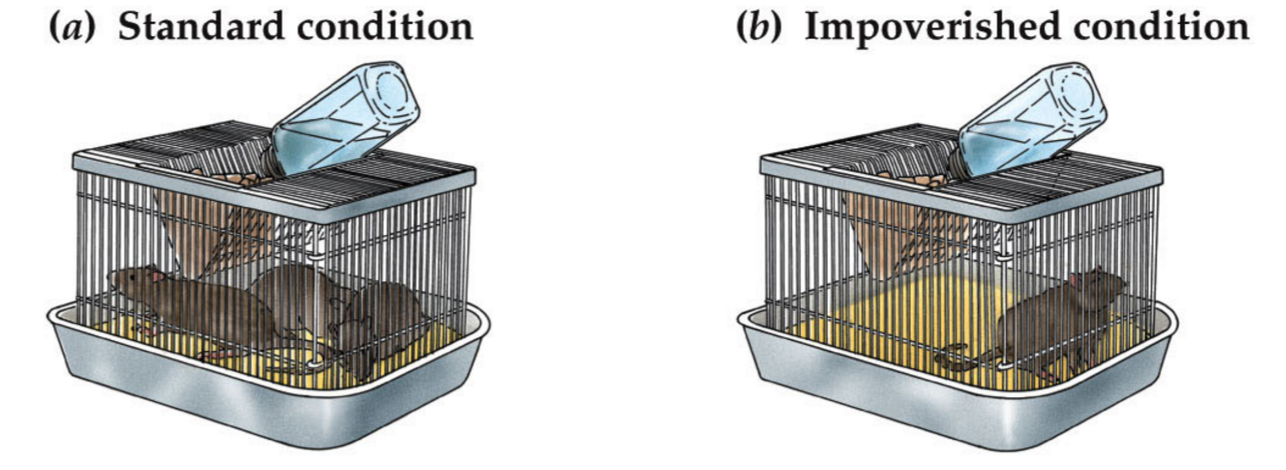
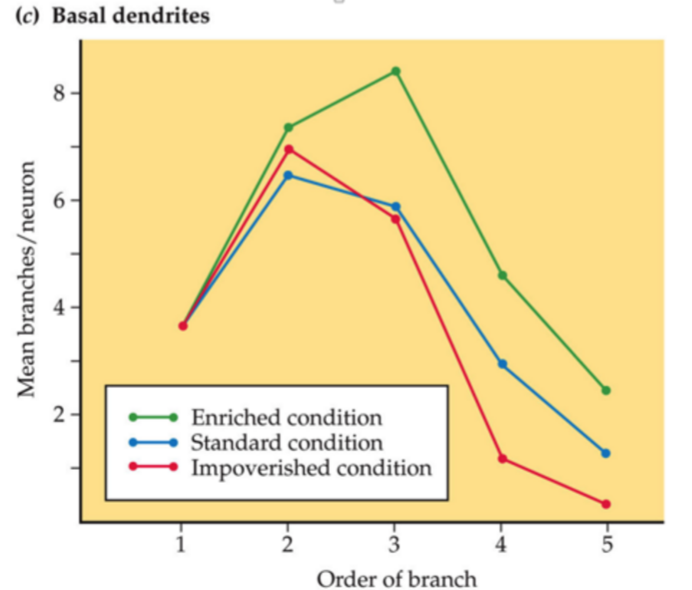
<p>In one experiment we covered in class, rats were placed in 3 different environments: one standard, one impoverished, and one enriched.</p>
<p><img src="/img/bad-environment.png" alt="Bad environments"></p>
<p><img src="/img/good-environment.png" alt="Good environment"></p>
<p>The rats that were raised in the enriched environments made many more neural pathways than the other two. They were able to learn more because they were exposed to more stimuli.</p>
<p><img src="/img/enriched.png" alt="Drawing" style="width: 300px;"></p>
<h2 id="I-used-to-be-terrible"><a href="#I-used-to-be-terrible" class="headerlink" title="I used to be terrible"></a>I used to be terrible</h2><p>I usually give two dates as the time I began programming: in elementary school, when I discovered that you could create websites for your virtual pet, and in high school, when I found the modding community for a game called Minecraft.</p>
<p>In elementary school, I learned everything on my own. I had a book on HTML 4 by Wendy Willard and scoured Google for anything I could find about HTML, CSS, and PHP. I had no guidance and basically copied and pasted scripts to make things work. I had some okay projects out there, but overall, I didn’t really have understanding of how things worked.</p>
<h2 id="How-I-got-good-at-programming"><a href="#How-I-got-good-at-programming" class="headerlink" title="How I got good at programming"></a>How I got good at programming</h2><p>Things changed when I found <a href="http://bukkit.org" target="_blank" rel="external">Bukkit</a>, a Minecraft modding community. From the forums and IRC, I met some really cool people online and created games with them. We would code together all night while sharing different ideas, techniques, and technologies.</p>
<p>I learned even more when I found <a href="http://spout.org" target="_blank" rel="external">Spout</a>, an open source Minecraft clone. I joined a “team” of developers called VolumetricPixels, which over time evolved into a sort of support group for people to talk about their projects. We discussed things ranging from Rust to managing a Jenkins CI server. The group taught me more than any of those W3Schools-like websites taught me, as I was put in an enriching environment surrounded by people who loved to code.</p>
<p>Even better was the opportunity to contribute to the Spout project. I learned so much about 3D rendering and game engines from the incredible mentorship I received from more senior members of the community. I had people that I could talk to that would tell me where my shortcomings were, and I would improve rapidly because of it.</p>
<h2 id="The-people-who-surround-you-determine-your-life"><a href="#The-people-who-surround-you-determine-your-life" class="headerlink" title="The people who surround you determine your life"></a>The people who surround you determine your life</h2><p>VolumetricPixels set me on a path to become pretty good at programming, and I didn’t even realize that I was working. I was just playing around on the computer making games! The people I would talk to every day helped me realize what I could improve on, as everyone in the group had their own strengths and weaknesses.</p>
<p>The people you talk to the most generally influence the way you think and do things, so it was no surprise that I would become a person who loves programming after spending so much time talking to other teenage developers.</p>
<h2 id="Choose-your-friends-wisely"><a href="#Choose-your-friends-wisely" class="headerlink" title="Choose your friends wisely"></a>Choose your friends wisely</h2><p>Every single person you decide to spend your time with influences your interests and decisions.</p>
<pre><code>&quot;You are the average of the five people you spend the most time with.&quot; -- Jim Rohn
</code></pre><p>Your choice of friends and the people you surround yourself with can either make or break your success. Pick people whom you know will help you become better in what you want to do in your life, and the knowledge and “discipline” will follow.</p>
<p>I say “discipline” in quotes because you do not feel like something is a chore when all your friends do it for fun. You don’t think of playing sports as a chore if all of your friends are doing it, despite it being exercise. Likewise, if all your friends are passionate about something and have fun doing it, you will absorb that energy and be able to love what they do as well.</p>
<p>Hence, the secret to getting good at anything is obvious: have fun doing it and you won’t notice even how hard you’re working. The results will come in without you even realizing it.</p>
]]></content>
    
    <summary type="html">
    
      &lt;p&gt;I never intended to go into software during high school. I thought I was going to be a doctor, yet on the side, I managed to amass a good
    
    </summary>
    
    
  </entry>
  
  <entry>
    <title>Ruby WTF? Escaping single quotes in Ruby using gsub</title>
    <link href="https://simplyian.com/2015/10/19/Ruby-WTF-Escaping-single-quotes-in-Ruby-using-gsub/"/>
    <id>https://simplyian.com/2015/10/19/Ruby-WTF-Escaping-single-quotes-in-Ruby-using-gsub/</id>
    <published>2015-10-19T14:59:27.000Z</published>
    <updated>2015-11-07T04:53:18.000Z</updated>
    
    <content type="html"><![CDATA[<p>I’m currently working on a project which requires me to escape JavaScript (don’t ask why). To get it working, I had to escape single quotes. I was encountering weird behavior in my code, so I ran the following in IRB.</p>
<figure class="highlight plain"><table><tr><td class="gutter"><pre><span class="line">1</span><br><span class="line">2</span><br></pre></td><td class="code"><pre><span class="line">2.2.1 :002 &gt; &quot;Doesn&apos;t work&quot;.gsub(&quot;&apos;&quot;, &quot;\\&apos;&quot;)</span><br><span class="line"> =&gt; &quot;Doesnt workt work&quot;</span><br></pre></td></tr></table></figure>
<p><a href="https://www.destroyallsoftware.com/talks/wat" target="_blank" rel="external">WAT.</a></p>
<p>I did a bit of investigation (read: <a href="http://stackoverflow.com/questions/2180322/ruby-gsub-doesnt-escape-single-quotes" target="_blank" rel="external">Stack Overflow</a>) and found that <code>\&#39;</code> is a special escape sequence in the gsub replacement – it’s a backreference that represents <code>$&#39;</code>, the characters that match after the single quote.</p>
<p>In order to fix this bug, you must escape the backslash within gsub as so:</p>
<figure class="highlight plain"><table><tr><td class="gutter"><pre><span class="line">1</span><br><span class="line">2</span><br></pre></td><td class="code"><pre><span class="line">2.2.1 :003 &gt; &quot;Doesn&apos;t work&quot;.gsub(&quot;&apos;&quot;, &quot;\\\\&apos;&quot;)</span><br><span class="line"> =&gt; &quot;Doesn\\&apos;t work&quot;</span><br></pre></td></tr></table></figure>
<p><em>Nota bene: The double backslash returned by IRB is actually a single escaped backslash – it hasn’t generated another one.</em></p>
<p>gsub first escapes everything as a Ruby string, then it parses the result of that string as a regex. It’s not documented well at all – I couldn’t find anything on this in the documentation.</p>
<p>Ruby’s such a weird language.</p>
]]></content>
    
    <summary type="html">
    
      &lt;p&gt;I’m currently working on a project which requires me to escape JavaScript (don’t ask why). To get it working, I had to escape single quot
    
    </summary>
    
    
      <category term="Ruby" scheme="https://simplyian.com/tags/Ruby/"/>
    
  </entry>
  
  <entry>
    <title>The benefit of destructuring function arguments in ES6</title>
    <link href="https://simplyian.com/2015/09/28/The-benefit-of-destructuring-function-arguments-in-ES6/"/>
    <id>https://simplyian.com/2015/09/28/The-benefit-of-destructuring-function-arguments-in-ES6/</id>
    <published>2015-09-28T19:32:27.000Z</published>
    <updated>2015-09-28T21:28:30.000Z</updated>
    
    <content type="html"><![CDATA[<p>ES6 brings a lot of great features to JavaScript to make it a much more modern and powerful language to work with. The days of “JavaScript sucks because it was only built in a week” have passed. One really great feature in ES6 is destructuring.</p>
<p>In statically typed languages, one can easily know what arguments are needed in a function by the types passed into it. For example, in Java, the following function definition is very clear:</p>
<figure class="highlight plain"><table><tr><td class="gutter"><pre><span class="line">1</span><br></pre></td><td class="code"><pre><span class="line">public void sendMessage(Target target, String message);</span><br></pre></td></tr></table></figure>
<p>It’s obvious that the receiver of a message should be a target. In a modern IDE, calls like <code>sendMessage(user, msg)</code> would obviously send messages to a <code>Target</code>, as it is known that <code>user</code> would be part of a certain class.</p>
<p>However, in JavaScript or other dynamically typed languages, things are a little harder to decipher. <code>user</code> may be a user id, a user object, a username, etc.</p>
<p>Furthermore, <code>user</code> is a variable name, so literally anything can be passed in. A call like <code>sendMessage(first, s)</code> can be tricky to understand.</p>
<p>It’s also pretty easy to swap the positions of variables, and there is no compiler to check if you are sending in the correct arguments.</p>
<h2 id="The-Solution"><a href="#The-Solution" class="headerlink" title="The Solution"></a>The Solution</h2><p>One way I’ve found to solve this problem using ES6 is function argument destructuring.</p>
<p>In ES5, a function may look like this:</p>
<figure class="highlight plain"><table><tr><td class="gutter"><pre><span class="line">1</span><br><span class="line">2</span><br><span class="line">3</span><br></pre></td><td class="code"><pre><span class="line">function sendMessage(target, msg) &#123; /* ... */ &#125;</span><br><span class="line"></span><br><span class="line">sendMessage(usr, &quot;Hello&quot;);</span><br></pre></td></tr></table></figure>
<p>The same function using argument destructuring would look like this:</p>
<figure class="highlight plain"><table><tr><td class="gutter"><pre><span class="line">1</span><br><span class="line">2</span><br><span class="line">3</span><br></pre></td><td class="code"><pre><span class="line">function sendMessage(&#123; target, msg &#125;) &#123; /* ... */ &#125;</span><br><span class="line"></span><br><span class="line">sendMessage(&#123; target: usr, msg: &quot;Hello&quot; &#125;);</span><br></pre></td></tr></table></figure>
<p>Intent is much more clear in the second version than the first. This is very useful if you have many arguments to functions. If some are optional, you don’t even have to pass in every single argument, as arguments are not positional. For example:</p>
<figure class="highlight plain"><table><tr><td class="gutter"><pre><span class="line">1</span><br><span class="line">2</span><br><span class="line">3</span><br><span class="line">4</span><br><span class="line">5</span><br></pre></td><td class="code"><pre><span class="line">function sendMessage(&#123; target, msg, notifySms = false, notifyEmail = false &#125;) &#123; /* ... */ &#125;</span><br><span class="line"></span><br><span class="line">sendMessage(&#123; target: usr, msg: &quot;Hello&quot; &#125;);</span><br><span class="line">sendMessage(&#123; target: other, msg: &quot;Look at your phone&quot;, notifySms: true &#125;);</span><br><span class="line">sendMessage(&#123; target: other, msg: &quot;Look at your email&quot;, notifyEmail: true &#125;);</span><br></pre></td></tr></table></figure>
<p>Now you can easily pass options into your functions without function calls having a lot of falsy/nil values.</p>
]]></content>
    
    <summary type="html">
    
      &lt;p&gt;ES6 brings a lot of great features to JavaScript to make it a much more modern and powerful language to work with. The days of “JavaScrip
    
    </summary>
    
    
      <category term="javascript" scheme="https://simplyian.com/tags/javascript/"/>
    
      <category term="es6" scheme="https://simplyian.com/tags/es6/"/>
    
  </entry>
  
  <entry>
    <title>Doing homework assignments in Markdown using Pandoc and LaTeX</title>
    <link href="https://simplyian.com/2015/09/13/Doing-homework-assignments-in-Markdown-using-Pandoc-and-LaTeX/"/>
    <id>https://simplyian.com/2015/09/13/Doing-homework-assignments-in-Markdown-using-Pandoc-and-LaTeX/</id>
    <published>2015-09-13T13:57:43.000Z</published>
    <updated>2015-09-13T15:22:14.000Z</updated>
    
    <content type="html"><![CDATA[<p><a href="http://daringfireball.net/projects/markdown/" target="_blank" rel="external">Markdown</a> is a really awesome format for text and prose. It’s really easy to manage in any text editor, and it’s quick to write. It has a lot of features, including <strong>bolding</strong>, <em>italicizing</em>, lists, quotes, embedded code, and more. It’s so easy to write that it’s the “language” of choice for many major websites such as StackOverflow and Reddit, it being much easier to implement and looking nicer than a WYSIWYG text editor. I’m even writing this blog post using Markdown. However, you can’t really send someone a Markdown document. It’s meant to be processed into a more readable format, most usually HTML.</p>
<p><a href="http://www.latex-project.org/" target="_blank" rel="external">LaTeX</a> is a great tool for typesetting text. It has a lot of flexibility and standardizes how documents look. It’s so powerful that it has become the defacto tool to create research papers. However, there is definitely a learning curve in using the software, and the source doesn’t look very nice.</p>
<p><a href="http://pandoc.org/" target="_blank" rel="external">Pandoc</a> brings the best of both worlds. It allows conversion of Markdown to a predefined LaTeX template, allowing you to use Markdown to write LaTeX documents in a format that works out 99% of the time if you’re just writing notes or submitting a linear homework assignment. Usage is simple:</p>
<figure class="highlight bash"><table><tr><td class="gutter"><pre><span class="line">1</span><br></pre></td><td class="code"><pre><span class="line">pandoc input.md -o output.(pdf|tex)</span><br></pre></td></tr></table></figure>
<p>This generates either a <code>.tex</code> or <code>.pdf</code> (compiled LaTeX) file that looks pretty good using the default settings.</p>
<h2 id="Generating-PDFs-quickly"><a href="#Generating-PDFs-quickly" class="headerlink" title="Generating PDFs quickly"></a>Generating PDFs quickly</h2><p>Since I use Markdown so much to generate PDFs, I’ve created the following shell function:</p>
<figure class="highlight bash"><table><tr><td class="gutter"><pre><span class="line">1</span><br><span class="line">2</span><br><span class="line">3</span><br></pre></td><td class="code"><pre><span class="line"><span class="function"><span class="title">md2pdf</span></span>() &#123;</span><br><span class="line">  pandoc <span class="variable">$1</span> -o `basename <span class="variable">$1</span> .md`.pdf</span><br><span class="line">&#125;</span><br></pre></td></tr></table></figure>
<p>You can add this to your <code>.bashrc</code> or <code>.zshrc</code> to add a command like follows:</p>
<figure class="highlight bash"><table><tr><td class="gutter"><pre><span class="line">1</span><br></pre></td><td class="code"><pre><span class="line">md2pdf filename.md</span><br></pre></td></tr></table></figure>
<p>This will generate a file named <code>filename.pdf</code> in your present working directory.</p>
<p>You can use file watching tools to automatically generate a PDF and leave it open/refreshing in your PDF reader. I personally use a tool called <a href="http://entrproject.org/" target="_blank" rel="external">entr(1)</a>, which can be installed via Homebrew.</p>
<h2 id="Writing-equations"><a href="#Writing-equations" class="headerlink" title="Writing equations"></a>Writing equations</h2><p>You may want to insert some math into your document. You can do this by surrounding your math in dollar signs (<code>$</code>) and writing in LaTeX form, for example:</p>
<figure class="highlight plain"><table><tr><td class="gutter"><pre><span class="line">1</span><br><span class="line">2</span><br><span class="line">3</span><br><span class="line">4</span><br><span class="line">5</span><br><span class="line">6</span><br></pre></td><td class="code"><pre><span class="line">## Euler&apos;s identity</span><br><span class="line">Below is Euler&apos;s identity.</span><br><span class="line"></span><br><span class="line">$e^&#123;i\pi&#125; + 1 = 0$</span><br><span class="line"></span><br><span class="line">Lorem ipsum dolor sit amet...</span><br></pre></td></tr></table></figure>
<p>This produces the equation inline. Documentation for this feature of Pandoc is pretty spotty – if you know of more ways to embed LaTeX equations in Pandoc-generated documents, please let me know!</p>
<h2 id="Setting-everything-up"><a href="#Setting-everything-up" class="headerlink" title="Setting everything up"></a>Setting everything up</h2><p>All of the tools mentioned can be installed via Homebrew.</p>
<figure class="highlight plain"><table><tr><td class="gutter"><pre><span class="line">1</span><br><span class="line">2</span><br></pre></td><td class="code"><pre><span class="line">brew install entr pandoc</span><br><span class="line">brew cask install mactex</span><br></pre></td></tr></table></figure>
<p>Writing Markdown instead of LaTeX allows me to iterate faster on my homework/notes and lets me worry more about my content than the formatting of my sections and subsections. It’s really easy to set everything up, and as a Vim user, it has increased my productivity quite a bit. I hope you find my workflow as useful as I have!</p>
]]></content>
    
    <summary type="html">
    
      &lt;p&gt;&lt;a href=&quot;http://daringfireball.net/projects/markdown/&quot; target=&quot;_blank&quot; rel=&quot;external&quot;&gt;Markdown&lt;/a&gt; is a really awesome format for text an
    
    </summary>
    
    
      <category term="markdown" scheme="https://simplyian.com/tags/markdown/"/>
    
      <category term="pandoc" scheme="https://simplyian.com/tags/pandoc/"/>
    
      <category term="latex" scheme="https://simplyian.com/tags/latex/"/>
    
  </entry>
  
  <entry>
    <title>Using form-horizontal with simple_form in Rails 4</title>
    <link href="https://simplyian.com/2015/04/23/Using-form-horizontal-with-simple-form-in-Rails-4/"/>
    <id>https://simplyian.com/2015/04/23/Using-form-horizontal-with-simple-form-in-Rails-4/</id>
    <published>2015-04-23T18:14:44.000Z</published>
    <updated>2015-04-23T19:18:54.000Z</updated>
    
    <content type="html"><![CDATA[<p><a href="https://github.com/plataformatec/simple_form" target="_blank" rel="external">simple_form</a> is a really great gem for generating bootstrap forms. However, you have to<br>do a little extra to get it working with <a href="http://getbootstrap.com/" target="_blank" rel="external">Bootstrap’s</a> <code>form-horizontal</code> class. The<br>README doesn’t mention this, but it’s built in. Just write your form declaration like this:</p>
<figure class="highlight plain"><table><tr><td class="gutter"><pre><span class="line">1</span><br><span class="line">2</span><br><span class="line">3</span><br><span class="line">4</span><br><span class="line">5</span><br><span class="line">6</span><br></pre></td><td class="code"><pre><span class="line">&lt;%= simple_form_for [:admin, @c], html: &#123; class: &apos;form-horizontal&apos; &#125;,</span><br><span class="line">  wrapper: :horizontal_form do |f| %&gt;</span><br><span class="line"></span><br><span class="line"># ...form...</span><br><span class="line"></span><br><span class="line">&lt;% end %&gt;</span><br></pre></td></tr></table></figure>
<p>Note the <code>wrapper</code> attribute. This isn’t described in the README, and I had to dig through the<br>code to figure it out.</p>
<p>Hope this helps someone!</p>
]]></content>
    
    <summary type="html">
    
      &lt;p&gt;&lt;a href=&quot;https://github.com/plataformatec/simple_form&quot; target=&quot;_blank&quot; rel=&quot;external&quot;&gt;simple_form&lt;/a&gt; is a really great gem for generatin
    
    </summary>
    
    
      <category term="rails" scheme="https://simplyian.com/tags/rails/"/>
    
      <category term="web" scheme="https://simplyian.com/tags/web/"/>
    
  </entry>
  
  <entry>
    <title>How to skip all Yaourt prompts on Arch Linux</title>
    <link href="https://simplyian.com/2015/02/15/How-to-skip-all-Yaourt-prompts-on-Arch-Linux/"/>
    <id>https://simplyian.com/2015/02/15/How-to-skip-all-Yaourt-prompts-on-Arch-Linux/</id>
    <published>2015-02-15T21:39:31.000Z</published>
    <updated>2015-04-23T19:03:16.000Z</updated>
    
    <content type="html"><![CDATA[<p><a href="https://wiki.archlinux.org/index.php/yaourt" target="_blank" rel="external">Yaourt</a> is probably the best tool to automatically download and install packages from the <a href="https://aur.archlinux.org/" target="_blank" rel="external">Arch User Repository</a>, also known as AUR. It’s really powerful; however, by default, it prompts you a <strong>LOT</strong> for confirmations of different things, such as checking if you want to install something, if you want to edit the <code>PKGBUILD</code>, etc. As a result, Yaourt is pretty annoying if you’re used to the hands-free nature of most other package managers.</p>
<p>As it turns out, there is a file you can create called <code>~/.yaourtrc</code> that can change the behavior of Yaourt.</p>
<p>To turn off all of the prompts, type the following into a new file called <code>~/.yaourtrc</code>:</p>
<figure class="highlight plain"><table><tr><td class="gutter"><pre><span class="line">1</span><br><span class="line">2</span><br><span class="line">3</span><br></pre></td><td class="code"><pre><span class="line">NOCONFIRM=1</span><br><span class="line">BUILD_NOCONFIRM=1</span><br><span class="line">EDITFILES=0</span><br></pre></td></tr></table></figure>
<p>The first line will skip the messages confirming if you really want to install the package.</p>
<p>The second line will skip the messages asking you if you want to continue the build.</p>
<p>The third and last line will skip the messages asking if you want to edit the <code>PKGBUILD</code> files.</p>
<p>When you’re done doing this, Yaourt should now stop being a pain to use. Have fun with your hands-free installs!</p>
]]></content>
    
    <summary type="html">
    
      &lt;p&gt;&lt;a href=&quot;https://wiki.archlinux.org/index.php/yaourt&quot; target=&quot;_blank&quot; rel=&quot;external&quot;&gt;Yaourt&lt;/a&gt; is probably the best tool to automaticall
    
    </summary>
    
    
      <category term="linux" scheme="https://simplyian.com/tags/linux/"/>
    
      <category term="arch" scheme="https://simplyian.com/tags/arch/"/>
    
  </entry>
  
  <entry>
    <title>Why hard work doesn&#39;t matter</title>
    <link href="https://simplyian.com/2015/02/03/Why-hard-work-doesn-t-matter/"/>
    <id>https://simplyian.com/2015/02/03/Why-hard-work-doesn-t-matter/</id>
    <published>2015-02-03T15:47:19.000Z</published>
    <updated>2015-04-23T19:03:16.000Z</updated>
    
    <content type="html"><![CDATA[<p><strong>Hard work pays off.</strong> That expression is always said in today’s society, and it’s considered a good trait to have. However, many people every day work hard, yet they still find themselves struggling to pay bills or live.</p>
<p>I don’t believe that hard work is what you should strive for. Rather, it should be <strong>valuable work.</strong></p>
<h2 id="W-Fd"><a href="#W-Fd" class="headerlink" title="W = Fd"></a>W = Fd</h2><p>If you still remember high school, you might remember the equation for work:</p>
<p><strong>Work = Force * Distance</strong></p>
<p>The <strong>time your work takes</strong> can be thought of like the <strong>distance</strong> component. Time is constant for everyone; everyone has it in the same amount and can choose however to spend it. We all have the same distance in the work equation. Putting a lot of time into something equates to <strong>hard work</strong>.</p>
<p>The actual <strong>value of your time</strong> can be thought of like the <strong>force</strong> component. Just like you can apply more force when lifting something, you can learn different skills to increase how much your time work; e.g. you could learn iOS development in order to become more well rounded in order to get better jobs.</p>
<p>Finally, the <strong>work</strong> component refers to the value of your work; it is the amount of work you output based on your time and the value of your time, the product of force times distance.</p>
<h2 id="Bounds-to-time-and-value-of-time"><a href="#Bounds-to-time-and-value-of-time" class="headerlink" title="Bounds to time and value of time"></a>Bounds to time and value of time</h2><p>Time is bounded by the laws of the universe: you can only put 24 hours a day into something. You could work extremely hard, yet there is a limit to how hard you can work.</p>
<p>On the other hand, value of time is unbounded: you can always get better at a skill or hire more people. You can end up like Mark Zuckerberg, where you’re the CEO of one of the biggest technology companies in the world and just tell people what to do, and your time is extremely valuable.</p>
<p>Despite working extremely hard, if the value of your time is low, you won’t be able to work hard enough in order to get where you want to be. However, if you focus on maximizing the value of your time, the possibilities are limitless.</p>
<p>Focus on increasing how good you are and how valuable you are as a person rather than spending all of your time on menial tasks just to get quick money, especially if you’re currently in school.</p>
]]></content>
    
    <summary type="html">
    
      &lt;p&gt;&lt;strong&gt;Hard work pays off.&lt;/strong&gt; That expression is always said in today’s society, and it’s considered a good trait to have. However
    
    </summary>
    
    
  </entry>
  
  <entry>
    <title>Why abstraction is important when constructing algorithms</title>
    <link href="https://simplyian.com/2015/02/02/Why-abstraction-is-important-when-constructing-algorithms/"/>
    <id>https://simplyian.com/2015/02/02/Why-abstraction-is-important-when-constructing-algorithms/</id>
    <published>2015-02-02T14:09:16.000Z</published>
    <updated>2015-04-23T19:03:16.000Z</updated>
    
    <content type="html"><![CDATA[<p>In order to get better at algorithms (my greatest weakness), I’m currently going through the <a href="https://www.coursera.org/course/algo" target="_blank" rel="external">Stanford algorithm design course</a>. To learn the concepts better, I decided to implement <a href="http://en.wikipedia.org/wiki/Karatsuba_algorithm" target="_blank" rel="external">Karatsuba multiplication</a> in JavaScript. <a href="https://github.com/simplyianm/node-misc-problems/blob/master/src/karatsuba.js" target="_blank" rel="external">(The fruits of my labor can be found on my miscellaneous algorithm GitHub repository.)</a>.</p>
<p><strong>This algorithm, only 43 lines, took me about an hour to code.</strong> I already knew the details of the algorithm from the video. Why? Because I was prepending the wrong number of zeroes to the number when figuring out where to split the number.</p>
<p>Why was this happening? Originally, my <code>prependZeroes</code> method was being done inline, and I wasn’t testing it properly.</p>
<p>Abstraction is important because you can test individual parts of an algorithm to make sure they are correct so you can figure out where your algorithm is failing. It also allows your code to be more symmetrical, making it a lot easier to follow.</p>
<p>If I had abstracted the prependZeroes method and had written unit tests for that method specifically, this algorithm would have been much faster to write. Instead, I wasted a ton of time writing <code>console.log</code> statements in order to figure out where my bug was.</p>
<p>Break algorithms up into as many functions/parts as possible, so you can test your algorithms much more easily.</p>
]]></content>
    
    <summary type="html">
    
      &lt;p&gt;In order to get better at algorithms (my greatest weakness), I’m currently going through the &lt;a href=&quot;https://www.coursera.org/course/alg
    
    </summary>
    
    
      <category term="programming" scheme="https://simplyian.com/tags/programming/"/>
    
  </entry>
  
  <entry>
    <title>The real reason why Caps Lock and Escape are in terrible positions</title>
    <link href="https://simplyian.com/2015/01/08/The-real-reason-why-Caps-Lock-and-Escape-are-in-terrible-positions/"/>
    <id>https://simplyian.com/2015/01/08/The-real-reason-why-Caps-Lock-and-Escape-are-in-terrible-positions/</id>
    <published>2015-01-08T18:41:08.000Z</published>
    <updated>2015-04-23T19:03:16.000Z</updated>
    
    <content type="html"><![CDATA[<p>It is a truth universally acknowledged that <strong>the Caps Lock key is completely useless.</strong> I use it about once or twice a year, and that definitely does not warrant it a spot right next to my pinky finger on the home row. It’s in a place that is just as convenient as the Enter key, despite being completely useless.</p>
<p>Conversely, the Escape key is extremely useful. I use it when watching full screen videos on YouTube, closing chats on Facebook, and using commands in Vim. However, it often is in the worst spot possible to be used extremely frequently: the top left of the keyboard. And on many laptops, it’s tiny.</p>
<p><img src="/img/chromebook-keyboard.png" alt="Chromebook Keyboard"><br><img src="/img/escape-mac.png" alt="Mac Keyboard"></p>
<p>For heavy escape users, this is an incredible boon to productivity.</p>
<h2 id="How-Caps-Lock-got-its-prominent-position"><a href="#How-Caps-Lock-got-its-prominent-position" class="headerlink" title="How Caps Lock got its prominent position"></a>How Caps Lock got its prominent position</h2><p>Back in the days of the typewriter, the Shift key basically shifted some mechanisms in the typewriter to allow you to type another set of characters, usually uppercase. “Shift Lock” was a toggle that basically kept the keyboard in shifted position, and it was located in the same position that Caps Lock is located on most keyboards today.</p>
<p><img src="/img/typewriter.png" alt="typewriter"></p>
<p>When the days of computing came around, Caps Lock was moved to where the Control key now is, and the Control key was placed in the location of Caps Lock. However, the Control key was inconvenient to former typewriter users and mainframe users, and the Caps Lock key was moved pack to its original position on the 101 Enhanced Keyboard by IBM.</p>
<p><img src="/img/101key-ibm.png" alt="101-Key IBM"></p>
<p>This 101 Enhanced Keyboard soon became the de-facto standard for keyboard layouts, which is why our keyboards have this Caps Lock positioning. <a href="http://www.pcguide.com/ref/kb/layout/stdEnh101-c.html" target="_blank" rel="external">More info on the 101 Enhanced Keyboard can be found here.</a></p>
<h2 id="How-the-Escape-key-was-placed-in-the-worst-possible-position"><a href="#How-the-Escape-key-was-placed-in-the-worst-possible-position" class="headerlink" title="How the Escape key was placed in the worst possible position"></a>How the Escape key was placed in the worst possible position</h2><p>Meanwhile, the Escape key was placed on the very far top left on the keyboard, meant to be used as much as much as the function keys. It was created in the 1960’s to allow programmers to switch from one type of code to another.</p>
<p>However, once this made no sense for the general user, Windows began using the key to close dialogs, mostly to mean “Stop”. Other operating systems followed, and Escape became the key to exit or suspend the program in some sort of way.</p>
<h2 id="Why-Vi-uses-the-Escape-key-to-switch-modes"><a href="#Why-Vi-uses-the-Escape-key-to-switch-modes" class="headerlink" title="Why Vi uses the Escape key to switch modes"></a>Why Vi uses the Escape key to switch modes</h2><p>If you’re a Vi/Vim user, you probably use the Escape key quite a bit. It’s necessary to be able to any of the features of the program, and you’ll probably find yourself hitting it at least twice per minute. The positioning doesn’t make sense however, as it’s in such an awkward spot. Why not the Control key? Or the Alt key?</p>
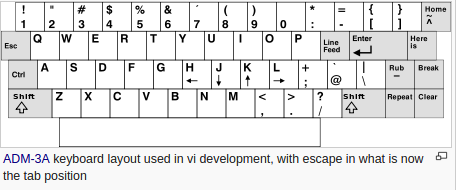
<p>Vi was built for a keyboard where Escape was in the position of Tab and Control was in the position of Caps Lock: <strong>the ADM-3A.</strong></p>
<p><img src="/img/adm-3a.png" alt="ADM-3A Keyboard"></p>
<p>This is an incredibly convenient position. You don’t have to move your hand in order to hit the key, and the key is big, unlike the tiny squares on a current laptop keyboard. It’s too bad that keyboards aren’t built like that today.</p>
<h2 id="Solutions"><a href="#Solutions" class="headerlink" title="Solutions?"></a>Solutions?</h2><p>On Chromebooks, you can change your keyboard settings to map the “Search” button to the Escape key.</p>
<p>The easiest and cheapest solution is to swap Caps Lock and Escape. On systems running the X Window System, you can put the following into <code>~/.Xmodmap</code>.</p>
<figure class="highlight plain"><table><tr><td class="gutter"><pre><span class="line">1</span><br><span class="line">2</span><br><span class="line">3</span><br><span class="line">4</span><br><span class="line">5</span><br></pre></td><td class="code"><pre><span class="line">! Swap caps lock and escape</span><br><span class="line">remove Lock = Caps_Lock</span><br><span class="line">keysym Escape = Caps_Lock</span><br><span class="line">keysym Caps_Lock = Escape</span><br><span class="line">add Lock = Caps_Lock</span><br></pre></td></tr></table></figure>
<p>There are many other solutions on how to do this, but the above is the one I currently use as a Linux user.</p>
<p>However, you still have the issue of mislabeled keys. Additionally, this fix does not work on Windows.</p>
<p>There are several keyboards out there that you can purchase that have the keys in a nice spot, e.g. the <a href="http://www.amazon.com/gp/product/B000EXZ0VC/ref=as_li_tl?ie=UTF8&amp;camp=1789&amp;creative=390957&amp;creativeASIN=B000EXZ0VC&amp;linkCode=as2&amp;tag=colleged07a-20&amp;linkId=NZT5S47X3O26UYYH" target="_blank" rel="external">Happy Hacking Keyboard</a>. However, they’re usually a bit expensive as they’re produced in very limited quantities due to the low demand.</p>
<p>Caps Lock and Escape were designed in a time where we didn’t have many of the tools we have today. They’re relics of the past that have carried on throughout computing history.</p>
]]></content>
    
    <summary type="html">
    
      &lt;p&gt;It is a truth universally acknowledged that &lt;strong&gt;the Caps Lock key is completely useless.&lt;/strong&gt; I use it about once or twice a year
    
    </summary>
    
    
      <category term="vim" scheme="https://simplyian.com/tags/vim/"/>
    
  </entry>
  
  <entry>
    <title>Hacking Gmail to use custom domains for free</title>
    <link href="https://simplyian.com/2015/01/07/Hacking-GMail-to-use-custom-domains-for-free/"/>
    <id>https://simplyian.com/2015/01/07/Hacking-GMail-to-use-custom-domains-for-free/</id>
    <published>2015-01-07T18:00:22.000Z</published>
    <updated>2015-04-23T19:03:16.000Z</updated>
    
    <content type="html"><![CDATA[<p>It’s pretty much common knowledge that Gmail is awesome. It’s fast, connects seamlessly with the rest of your Google services such as Drive, has a cool app called <a href="http://www.google.com/inbox/" target="_blank" rel="external">Inbox</a>, and is overall an extremely powerful email service. However, to use it with a custom domain, you need to purchase <a href="https://www.google.com/work/apps/business/" target="_blank" rel="external">Google Apps</a> for either $5 or $10/month, which for casual users is a bit unnecessary. On top of that, you don’t even get all of the features a personal account gets, e.g. Inbox.</p>
<p>However, there’s a free way to use your Gmail account with a custom domain: <a href="https://mailgun.com/" target="_blank" rel="external">Mailgun</a>.</p>
<p><img src="https://raw.githubusercontent.com/mailgun/media/master/Mailgun_Primary.png" alt="Mailgun Logo"></p>
<p><a href="https://mailgun.com/" target="_blank" rel="external">Mailgun</a> advertises itself as a set of “powerful APIs that enable you to send, receive and track email effortlessly.” Reading that description, you may be wondering how a developer tool could allow you to use <strong>Gmail with custom domains for free.</strong> Basically, Mailgun has two components that allow you to do this: an email forwarding service and an SMTP server.</p>
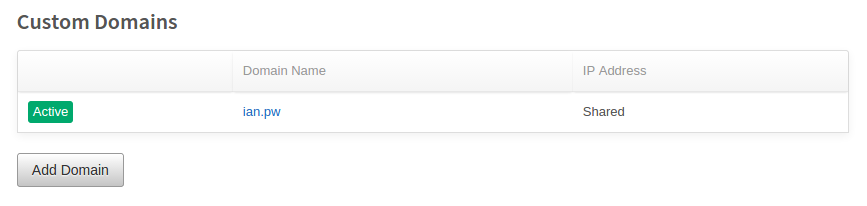
<h2 id="Setup"><a href="#Setup" class="headerlink" title="Setup"></a>Setup</h2><p>First, <a href="https://mailgun.com/signup" target="_blank" rel="external">sign up with Mailgun</a> using your Gmail email. <strong>Do not</strong> use your email with your custom domain, as it will cause problems later when you want to verify your account. Once you have clicked the confirm link, log in to the Mailgun website. You should be presented with a dashboard. Now on the right under “Custom Domains”, click “Add Domain”.</p>
<p><img src="/img/add-domain.png" alt="Add Domain"></p>
<p>Follow the instructions and set your DNS records with whoever manages your DNS.</p>
<p>Once you’ve done this, click on the “Routes” link on the top to set up email forwarding.</p>
<h2 id="Forwarding"><a href="#Forwarding" class="headerlink" title="Forwarding"></a>Forwarding</h2><p><img src="/img/routes.png" alt="Routes"></p>
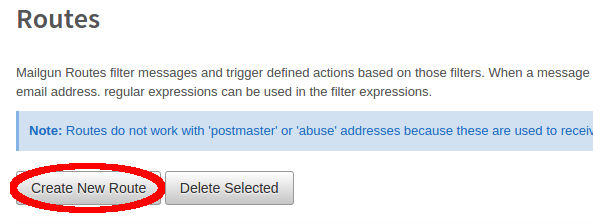
<p>On this page, you want to click “Create New Route”.</p>
<p><img src="/img/create-new-route.png" alt="Create New Route"></p>
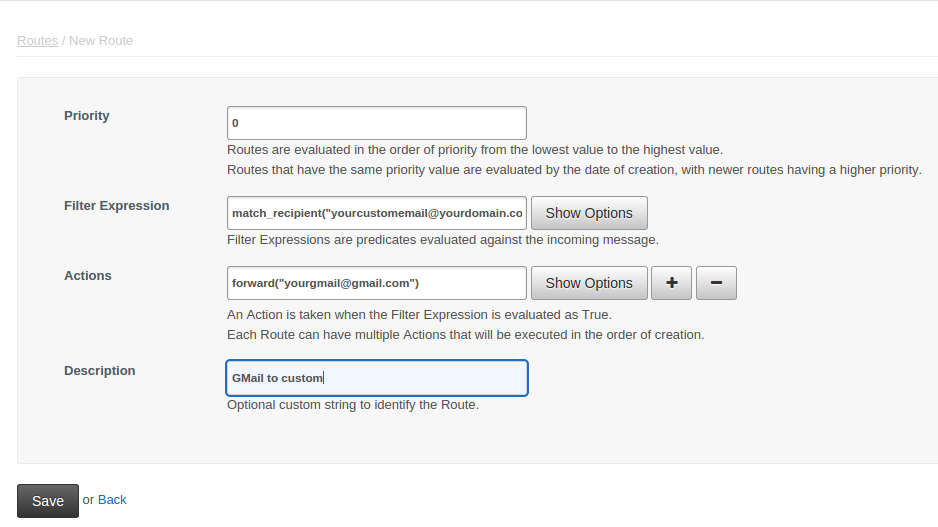
<p>Then, on this page, enter the following information:</p>
<p><img src="/img/setup-routes.png" alt="Setup Routes"></p>
<p>Replace the emails within the quotation marks with the desired emails.</p>
<h2 id="Sending-with-SMTP"><a href="#Sending-with-SMTP" class="headerlink" title="Sending with SMTP"></a>Sending with SMTP</h2><p>Next, we will set up our SMTP configuration so we can send emails from an actual server.</p>
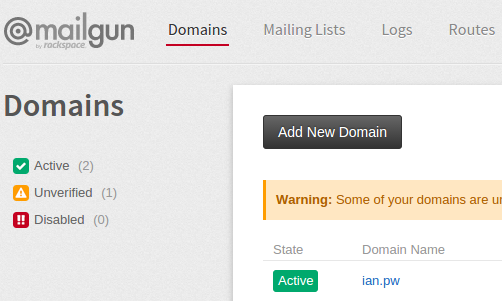
<p>Underneath the “Domains” tab, click on your domain name.</p>
<p><img src="/img/domains.png" alt="Domains"></p>
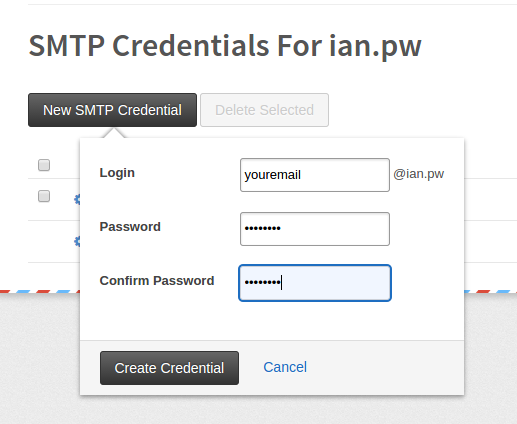
<p>On this page, click “Manage your SMTP credentials” then “New SMTP Credential” on the next page.</p>
<p><img src="/img/smtp.png" alt="SMTP"></p>
<p>Type in the desired SMTP credentials.</p>
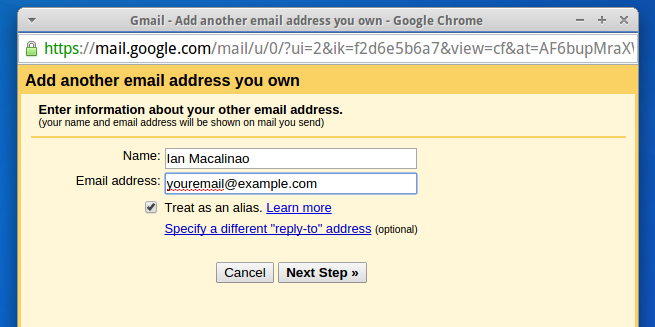
<p>Next, go to <a href="https://mail.google.com/mail/u/0/#settings/accounts" target="_blank" rel="external">the Accounts tab in your Gmail Settings</a> and click “Add another email address you own”. Once you open this window, enter the email address you wish to send from.</p>
<p><img src="/img/add-email.png" alt="Add Email"></p>
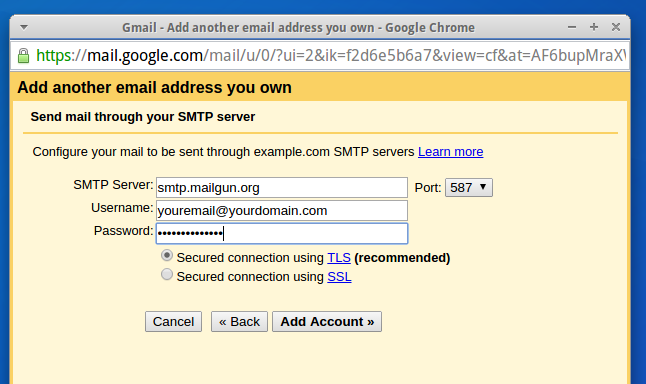
<p>Then, set the SMTP settings as follows.</p>
<p><img src="/img/email-smtp-settings.png" alt="Email SMTP Settings"></p>
<ul>
<li>Server: smtp.mailgun.org</li>
<li>Port: 587</li>
<li>Username: The full email address, e.g. “me@ian.pw”</li>
<li>Password: Whatever you set in Mailgun</li>
</ul>
<p>After clicking “Add Account”, now you’re done! Enjoy your free email service for up to 10,000 emails a month!</p>
]]></content>
    
    <summary type="html">
    
      &lt;p&gt;It’s pretty much common knowledge that Gmail is awesome. It’s fast, connects seamlessly with the rest of your Google services such as Dri
    
    </summary>
    
    
      <category term="hack" scheme="https://simplyian.com/tags/hack/"/>
    
      <category term="mailgun" scheme="https://simplyian.com/tags/mailgun/"/>
    
      <category term="gmail" scheme="https://simplyian.com/tags/gmail/"/>
    
      <category term="frugal" scheme="https://simplyian.com/tags/frugal/"/>
    
  </entry>
  
  <entry>
    <title>Creating a Todo app on the MEAN stack using Preston</title>
    <link href="https://simplyian.com/2014/12/20/Creating-a-Todo-app-on-the-MEAN-stack-using-Preston/"/>
    <id>https://simplyian.com/2014/12/20/Creating-a-Todo-app-on-the-MEAN-stack-using-Preston/</id>
    <published>2014-12-20T23:34:19.000Z</published>
    <updated>2015-04-23T19:03:16.000Z</updated>
    
    <content type="html"><![CDATA[<p><a href="http://prestonjs.com" target="_blank" rel="external">Preston</a> is an extremely powerful library for creating RESTful applications that use Mongoose models. In this tutorial, I’ll be hooking up the <a href="http://todomvc.com/examples/angularjs/#/" target="_blank" rel="external">AngularJS TodoMVC app</a> to a Preston-powered backend.</p>
<p>First, I’ve created a repo that is based off of the AngularJS Todo app. You can clone the first step like so:</p>
<figure class="highlight plain"><table><tr><td class="gutter"><pre><span class="line">1</span><br><span class="line">2</span><br></pre></td><td class="code"><pre><span class="line">git clone https://github.com/simplyianm/todomvc-preston-angular.git</span><br><span class="line">git checkout angular</span><br></pre></td></tr></table></figure>
<p>This is the TodoMVC app with a few changes for simplicity:</p>
<ol>
<li>It uses a CDN rather than Bower.</li>
<li>It uses Express to serve the app rather than being static HTML. This makes the differences between pure Angular to Angular+Preston much more pronounced.</li>
</ol>
<h2 id="Backend"><a href="#Backend" class="headerlink" title="Backend"></a>Backend</h2><p>To create our backend, we must first install Mongoose, Preston, and <a href="https://github.com/expressjs/body-parser" target="_blank" rel="external">body-parser</a> like so:</p>
<figure class="highlight plain"><table><tr><td class="gutter"><pre><span class="line">1</span><br></pre></td><td class="code"><pre><span class="line">npm install --save preston mongoose</span><br></pre></td></tr></table></figure>
<p>Once this is done, we’re ready to start writing the code for our app. We’ll write all of our backend code in <code>app.js</code>. First, let’s require Mongoose and Preston, so we can use them in our code.</p>
<figure class="highlight plain"><table><tr><td class="gutter"><pre><span class="line">1</span><br><span class="line">2</span><br></pre></td><td class="code"><pre><span class="line">var mongoose = require(&apos;mongoose&apos;);</span><br><span class="line">var preston = require(&apos;preston&apos;);</span><br></pre></td></tr></table></figure>
<p>Next, let’s connect to our MongoDB database. I’m using MongoHQ since this will be on Heroku, but you can use whatever MongoDB database you want.</p>
<figure class="highlight plain"><table><tr><td class="gutter"><pre><span class="line">1</span><br></pre></td><td class="code"><pre><span class="line">mongoose.connect(process.env.MONGOHQ_URL || &apos;mongodb://localhost:27017&apos;);</span><br></pre></td></tr></table></figure>
<p>Once Mongoose is connected, let’s define our model for our todos. We can define it like so:</p>
<figure class="highlight plain"><table><tr><td class="gutter"><pre><span class="line">1</span><br><span class="line">2</span><br><span class="line">3</span><br><span class="line">4</span><br></pre></td><td class="code"><pre><span class="line">var Todo = mongoose.model(&apos;Todo&apos;, new mongoose.Schema(&#123;</span><br><span class="line">  title: String,</span><br><span class="line">  completed: Boolean</span><br><span class="line">&#125;));</span><br></pre></td></tr></table></figure>
<p>Next, let’s add Preston into this. There are only three lines of code needed to create a fully functional JSON RESTful backend with Preston:</p>
<figure class="highlight plain"><table><tr><td class="gutter"><pre><span class="line">1</span><br><span class="line">2</span><br><span class="line">3</span><br></pre></td><td class="code"><pre><span class="line">app.use(require(&apos;body-parser&apos;).json());</span><br><span class="line">preston(Todo);</span><br><span class="line">app.use(&apos;/api&apos;, preston.middleware());</span><br></pre></td></tr></table></figure>
<p>The first line of code is required to parse the JSON request bodies which Preston depends on.</p>
<p>The second line of code tells Preston that we want to create routes for the <code>Todo</code> model. By default, all 5 methods (query, create, get, update, destroy) are exposed with full access. *Note: if you don’t want this in your own application, Preston has the power to control what gets sent in every one of those methods. <a href="https://github.com/simplyianm/preston" target="_blank" rel="external">Read the docs</a> for more details.</p>
<p>The last line tells Express to serve any registered models on the <code>/api</code> route. Thus, routes under <code>/api/todos</code> are created.</p>
<p>We’re going to add one more line of code to show what routes are created, for the sake of example:</p>
<figure class="highlight plain"><table><tr><td class="gutter"><pre><span class="line">1</span><br></pre></td><td class="code"><pre><span class="line">preston.printRoutes();</span><br></pre></td></tr></table></figure>
<p>This just prints all generated routes, without their prefixes.</p>
<h2 id="Frontend-Angular"><a href="#Frontend-Angular" class="headerlink" title="Frontend (Angular)"></a>Frontend (Angular)</h2><p>Fortunately, most of the AngularJS app is done. The TodoMVC example provides a sample connection to a sample RESTful backend (like ours). This is part of what makes Preston so powerful – <strong>it speaks the universal language of REST.</strong> There are tons of libraries out there to interface with REST: <a href="https://github.com/mgonto/restangular" target="_blank" rel="external">Restangular</a>, <a href="https://github.com/platanus/angular-restmod" target="_blank" rel="external">restmod</a>, etc.</p>
<p>To get the frontend working, you must populate the todos list and ignore the 404 check. You can do this with the following:</p>
<p>In <code>client/js/services/todoStorage.js</code>, make the <code>todoStorage</code> factory return the following:</p>
<figure class="highlight plain"><table><tr><td class="gutter"><pre><span class="line">1</span><br></pre></td><td class="code"><pre><span class="line">return $injector.get(&apos;api&apos;);</span><br></pre></td></tr></table></figure>
<p>In <code>client/js/app.js</code>, make the <code>resolve.store</code> function return <code>todoStorage</code>. Furthermore, add the following to <code>TodoCtrl</code>:</p>
<figure class="highlight plain"><table><tr><td class="gutter"><pre><span class="line">1</span><br><span class="line">2</span><br><span class="line">3</span><br><span class="line">4</span><br><span class="line">5</span><br></pre></td><td class="code"><pre><span class="line">$http.get(&apos;/api/todos&apos;).then(function(data) &#123;</span><br><span class="line">  data.data.map(function(todo) &#123;</span><br><span class="line">    store.todos.push(todo);</span><br><span class="line">  &#125;);</span><br><span class="line">&#125;);</span><br></pre></td></tr></table></figure>
<p>Don’t forget to inject <code>$http</code> into the controller. <a href="https://github.com/simplyianm/todomvc-preston-angular/commit/40ddf0212a252f99dc2974b3e6c63e4c8cfe5b48" target="_blank" rel="external">The entire diff of these changes can be found here.</a> If you were too lazy to follow this tutorial, you can also type <code>git checkout master</code> into your terminal to get to the latest version.</p>
<p>If you’re hosting the app on Heroku, you’ll also need to type <code>heroku addons:add mongohq</code> to get a database hooked up to your code.</p>
<p>The entire backend is now hooked up to Angular with little effort. <a href="https://todomvc-preston-angular.herokuapp.com/" target="_blank" rel="external">Try it here!</a></p>
<h2 id="Conclusion"><a href="#Conclusion" class="headerlink" title="Conclusion"></a>Conclusion</h2><p>Preston is a very powerful tool when used in conjunction with AngularJS. It can decrease the time it takes to get from idea to MVP significantly, as the backend code needed is extremely minimal. Preston solves the problem of creating a bunch of routes for your database whenever you need to create a model, as Preston just creates the most optimal routes and knows what you want.</p>
<p>In the future, I’ll write about using Preston with <a href="https://github.com/mgonto/restangular" target="_blank" rel="external">Restangular</a>, as the combination is even more powerful than using <code>$http</code> alone.</p>
]]></content>
    
    <summary type="html">
    
      &lt;p&gt;&lt;a href=&quot;http://prestonjs.com&quot; target=&quot;_blank&quot; rel=&quot;external&quot;&gt;Preston&lt;/a&gt; is an extremely powerful library for creating RESTful applicati
    
    </summary>
    
    
      <category term="preston" scheme="https://simplyian.com/tags/preston/"/>
    
      <category term="rest" scheme="https://simplyian.com/tags/rest/"/>
    
      <category term="MEAN" scheme="https://simplyian.com/tags/MEAN/"/>
    
      <category term="Node.js" scheme="https://simplyian.com/tags/Node-js/"/>
    
  </entry>
  
  <entry>
    <title>Getting Django To Work With Vagrant</title>
    <link href="https://simplyian.com/2014/11/10/getting-django-to-work-with-vagrant/"/>
    <id>https://simplyian.com/2014/11/10/getting-django-to-work-with-vagrant/</id>
    <published>2014-11-10T19:13:35.000Z</published>
    <updated>2015-04-23T19:03:16.000Z</updated>
    
    <content type="html"><![CDATA[<p>I was having problems getting Django working with Vagrant, then I stumbled upon this <a href="http://stackoverflow.com/questions/5984217/vagrants-port-forwarding-not-working" target="_blank" rel="external">StackOverflow answer</a>.</p>
<p>The problem with the port forwarding is not with Vagrant, but with Django itself. You need to bind to <code>0.0.0.0</code>, not <code>127.0.0.1</code>.</p>
<p>So you’d run this command:</p>
<figure class="highlight plain"><table><tr><td class="gutter"><pre><span class="line">1</span><br></pre></td><td class="code"><pre><span class="line">python migrate.py runserver 0.0.0.0:8000</span><br></pre></td></tr></table></figure>
<p>That will fix all of your issues.</p>
]]></content>
    
    <summary type="html">
    
      &lt;p&gt;I was having problems getting Django working with Vagrant, then I stumbled upon this &lt;a href=&quot;http://stackoverflow.com/questions/5984217/
    
    </summary>
    
    
  </entry>
  
  <entry>
    <title>The Coffeescript Keyword Nobody&#39;s Heard Of: &#39;by&#39;</title>
    <link href="https://simplyian.com/2014/11/04/the-coffeescript-keyword-nobodys-heard-of-by/"/>
    <id>https://simplyian.com/2014/11/04/the-coffeescript-keyword-nobodys-heard-of-by/</id>
    <published>2014-11-04T14:22:44.000Z</published>
    <updated>2015-04-23T19:03:16.000Z</updated>
    
    <content type="html"><![CDATA[<p>Coffeescript is an amazing language. As a matter of fact, it’s one of my favorite languages, second only to JavaScript. Here’s some recent code I used to split up one array into a multidimensional array with a certain number of columns.</p>
<figure class="highlight coffeescript"><table><tr><td class="gutter"><pre><span class="line">1</span><br></pre></td><td class="code"><pre><span class="line">matrix.push arr[i..(i + cols - <span class="number">1</span>)] <span class="keyword">for</span> i <span class="keyword">in</span> [<span class="number">0.</span>.arr.length - <span class="number">1</span>] <span class="keyword">by</span> cols</span><br></pre></td></tr></table></figure>
<p>Notice the second to last keyword: by.</p>
<p>The <code>by</code> keyword basically changes the increment of the generated for loop. Without the <code>by</code>, you’d have <code>i++</code> as the increment of your for loop. However, with the <code>by</code>, you’d instead have <code>i += 3</code> if you had <code>by 3</code>.</p>
<p>Here’s a simple example where I am getting money out of my bank account in the form of 5 dollar bills.</p>
<figure class="highlight coffeescript"><table><tr><td class="gutter"><pre><span class="line">1</span><br></pre></td><td class="code"><pre><span class="line"><span class="built_in">console</span>.log <span class="string">"I have <span class="subst">#&#123;i&#125;</span> dollars."</span> <span class="keyword">for</span> i <span class="keyword">in</span> [<span class="number">0.</span><span class="number">.100</span>] <span class="keyword">by</span> <span class="number">5</span></span><br></pre></td></tr></table></figure>
<p>This translates to the following Javascript:</p>
<figure class="highlight coffeescript"><table><tr><td class="gutter"><pre><span class="line">1</span><br><span class="line">2</span><br><span class="line">3</span><br><span class="line">4</span><br></pre></td><td class="code"><pre><span class="line">var i;</span><br><span class="line"><span class="keyword">for</span> (i = <span class="number">0</span>; i &lt;= <span class="number">100</span>; i += <span class="number">5</span>) &#123;</span><br><span class="line">  <span class="built_in">console</span>.log(<span class="string">"I have "</span> + i + <span class="string">" dollars."</span>);</span><br><span class="line">&#125;</span><br></pre></td></tr></table></figure>
<p>As you can see, the increment of the loop is now 5 rather than just 1.</p>
<p>Now the question is, are there any other hidden features of Coffeescript like this?</p>
]]></content>
    
    <summary type="html">
    
      &lt;p&gt;Coffeescript is an amazing language. As a matter of fact, it’s one of my favorite languages, second only to JavaScript. Here’s some recen
    
    </summary>
    
    
  </entry>
  
  <entry>
    <title>JSON Backends Are The Next Big Thing</title>
    <link href="https://simplyian.com/2014/08/07/json-backends-are-the-next-big-thing/"/>
    <id>https://simplyian.com/2014/08/07/json-backends-are-the-next-big-thing/</id>
    <published>2014-08-07T17:19:32.000Z</published>
    <updated>2015-04-23T19:03:16.000Z</updated>
    
    <content type="html"><![CDATA[<p><a href="http://angularjs.org" target="_blank" rel="external">AngularJS</a> is an awesome web framework made by Google<br>to create “structured web apps”. In this framework, templating is done client-side,<br>so all the server needs to do is send data to the client via HTTP. Thus, no templating<br>needs to be done on the backend and the web browser handles all of the data.<br>All the backend needs to do is send JSON.</p>
<p>This is awesome.</p>
<p>Why? Because data is now separate from the view. Model-View-Controller, or MVC for<br>short, has long been a standard of developing web applications as it organizes code<br>in a way that just makes sense. A controller takes a request and serves a model, the<br>data, and a view, which formats the data into a nice format.</p>
<p>However, since the introduction of the iPhone, web isn’t all we have to worry about.<br>Mobile apps are becoming almost necessary for services. Everyone does things from<br>their phone now, as not everyone wants to bring a laptop around everywhere they go.</p>
<p>Websites are not built for mobile devices. Yes, there is responsive web design, but<br>that does not beat the usefulness of an app that you can just click from your home<br>screen. Thus, apps are a necessity.</p>
<p>So let’s say you built a backend specific for your app. Great! But how about if you<br>need to deal with other platforms? For example, smart watches or smart TVs. You need<br>to build a whole new app that may have a completely different interface. To make this<br>easier, you can create an API which will make it easy to interface with your website.<br>You can even expose this API to developers to increase adoption of your product.</p>
<p>However, now you have this website that you simultaneously have to maintain. Every<br>new feature of the website has its own rendering mechanism completely separate from<br>the REST API. The features of the REST API aren’t synchronized with your website.</p>
<p>Here’s where frameworks like Angular come in. Angular can be like a mobile app,<br>dealing directly with your API. When you build a new feature on your website, you<br>can also build the logic into your API, causing you to only have to write your code<br>ONCE. Now you don’t have to worry about supporting certain operations on multiple<br>platforms, as you have one backend that handles all of the platforms.</p>
<p>JSON-based backends are awesome. Logic is written once, and all you have to worry about<br>is how your data is displayed. You can still support multiple platforms, but you only<br>need to write your backend logic once, as JSON is ubiquitous.</p>
]]></content>
    
    <summary type="html">
    
      &lt;p&gt;&lt;a href=&quot;http://angularjs.org&quot; target=&quot;_blank&quot; rel=&quot;external&quot;&gt;AngularJS&lt;/a&gt; is an awesome web framework made by Google&lt;br&gt;to create “stru
    
    </summary>
    
      <category term="Web" scheme="https://simplyian.com/categories/Web/"/>
    
    
  </entry>
  
  <entry>
    <title>How to Have Language-Specific Settings in Vim</title>
    <link href="https://simplyian.com/2014/04/28/how-to-have-language-specific-settings-in-vim/"/>
    <id>https://simplyian.com/2014/04/28/how-to-have-language-specific-settings-in-vim/</id>
    <published>2014-04-29T01:50:27.000Z</published>
    <updated>2015-04-23T19:03:16.000Z</updated>
    
    <content type="html"><![CDATA[<p>I wanted to set up Vim so that <a href="http://coffeescript.org/" target="_blank" rel="external">Coffeescript</a> files would use 2 spaces for indentation. This was very simple:</p>
<ol>
<li>Create a file at <code>~/.vim/ftplugin/&lt;language&gt;.vim</code> where <code>&lt;language&gt;</code> is the language you want to modify. For Coffeescript, this is <code>coffee</code>. The language name you should use is just the file extension.</li>
<li>In this file, add your settings. In my <code>coffee.vim</code>, I have <code>setlocal tabstop=2</code> and <code>setlocal shiftwidth=2</code> to make my tabs 2 spaces.</li>
<li>Open up a file in that language and enjoy your language specific settings!</li>
</ol>
]]></content>
    
    <summary type="html">
    
      &lt;p&gt;I wanted to set up Vim so that &lt;a href=&quot;http://coffeescript.org/&quot; target=&quot;_blank&quot; rel=&quot;external&quot;&gt;Coffeescript&lt;/a&gt; files would use 2 space
    
    </summary>
    
      <category term="Vim" scheme="https://simplyian.com/categories/Vim/"/>
    
    
  </entry>
  
  <entry>
    <title>Setting up Virtual Hosts in Apache</title>
    <link href="https://simplyian.com/2014/04/15/setting-up-virtual-hosts-in-apache/"/>
    <id>https://simplyian.com/2014/04/15/setting-up-virtual-hosts-in-apache/</id>
    <published>2014-04-16T04:17:35.000Z</published>
    <updated>2015-04-23T19:03:16.000Z</updated>
    
    <content type="html"><![CDATA[<p>Today, I wanted to put my downloads on a different domain from my screenshots. Not wanting to manage multiple servers for no reason, I set up virtual hosts, also known as vhosts. Basically, depending on what domain you visit my web server from, you will get a different website. This is actually very simple to set up.</p>
<p>First, navigate to your <code>apache2</code> directory and go to the <code>sites-available</code> directory within it. On my Debian system, this is at <code>/etc/apache2/sites-available/</code>. In this directory, you’ll see a bunch of files. Each one of these files is a config file that can be enabled or disabled individually; this is called a site.</p>
<p>To set up vhosting, you should first disable the default website. Use the command <code>sudo a2dissite default</code> to do this.</p>
<p>Next, add the rest of your websites. Here is the very simple config file I use:</p>
<figure class="highlight plain"><table><tr><td class="gutter"><pre><span class="line">1</span><br><span class="line">2</span><br><span class="line">3</span><br><span class="line">4</span><br><span class="line">5</span><br><span class="line">6</span><br><span class="line">7</span><br><span class="line">8</span><br><span class="line">9</span><br></pre></td><td class="code"><pre><span class="line">&lt;VirtualHost *:80&gt;</span><br><span class="line">    ServerName domain.you.want.to.use.com</span><br><span class="line">    DocumentRoot /var/www/sitefiles/</span><br><span class="line">    &lt;Directory /var/www/sitefiles/&gt;</span><br><span class="line">        Options Indexes FollowSymLinks MultiViews</span><br><span class="line">        Order allow,deny</span><br><span class="line">        Allow from all</span><br><span class="line">    &lt;/Directory&gt;</span><br><span class="line">&lt;/VirtualHost&gt;</span><br></pre></td></tr></table></figure>
<p>Save this to a file with the name of the site, no extension. I named my site <code>screenshots</code> for example.</p>
<p>Obviously, replace <code>domain.you.want.to.use.com</code> with the domain you want to use for the website. (For my screenshot website, this is <code>s.giza.us</code>.) The document root is the folder that contains the files at the root of your website. For me that’s <code>/var/www/screenshots</code>.</p>
<p>Lastly, type <code>sudo a2ensite sitename</code> where <code>sitename</code> is whatever you named that file. Then, restart apache with <code>sudo service apache2 restart</code>, and all is well. For any additional domains, create more config files with that information, replacing all of the relevant stuff. Enjoy your awesome new vhosted website!</p>
]]></content>
    
    <summary type="html">
    
      &lt;p&gt;Today, I wanted to put my downloads on a different domain from my screenshots. Not wanting to manage multiple servers for no reason, I se
    
    </summary>
    
      <category term="Apache" scheme="https://simplyian.com/categories/Apache/"/>
    
      <category term="Linux" scheme="https://simplyian.com/categories/Apache/Linux/"/>
    
    
  </entry>
  
</feed>